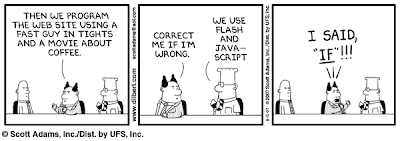
As embarrassing as it is but I have to admit that it took me three times to read this cartoon before I got the drift. Anyway, Flash is one of the items in my list of things I want to learn ASAP. I've been looking for a tutorial book but I haven't found one at a bargain price which, in my terms, is 300 pesos at the most. In any case, there are a lot of helpful tutorials online mostly from sites that are offering web hosting services for a fee. One only have to type "flash tutorial" in Google search to find a long list of this sites.
To show an example, I pasted a flash file which I got from Yahoo Answers. I first went to the page's page source (click view then page source in Firefox, or just Control+U) then Control+F to find the file-- *.scf. I copied the whole scf file name, pasted into this code <embed src=" the URL OF the .swf file " quality="high"></embed>, and then pasted the customized code in Edit Html of Blogger below.
BTW, if the Yamster the mouse isn't moving, Hit F5 or refresh.
Monday, November 19, 2007
Flash-- no, not the fast guy

Tuesday, November 13, 2007
Google Books Online
This is filed under Research
There may be an information explosion of tremendous proportions since the 1990's via the internet but one can't ever discount the value of published books which are more organized in content, written by more credible authors, edited by qualified editors and published by established publications. Google Books Search, which is in beta, has made it possible for researchers and book lovers alike to find the books they want to read or buy before they head off to their local bookstores or libraries. Some books which does not have copyright restrictions are even available in full view.
These are snapshots of what Google Books looks like. Click on the picture or caption to go to the actual web page:
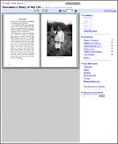
View the entire book
Snippet View
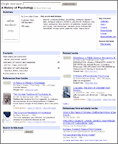
View a few sentences surrounding the search term
No Preview Available
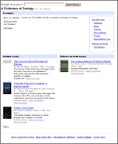
View basic information about the book
To make it even better, Google recently added cropping tool feature that would allow readers to copy and paste selections of the book. I don't recommend plagiarizing against book materials, but cropping tool allows a researcher to compile all the data onto a single source rather than opening and searching all the resource books every time the information is needed. Copy-and-paste feature also prevents misquotes when a portion of the book is quoted.
Saturday, November 10, 2007
Getting Traffic
This is filed under Marketing
Now that I already have a blog in place, the question that bugs me most right now is how do I get other people to read my blog? If I were one of my targeted readers, where do I usually go that would definitely lead me to this blog? Since my selling point is information and I'm targeting newbies like me, the most obvious answer would be the search engines with the most recall--Google and Yahoo. But I should be on the first to second page on the Search Engine Results Page (SERP) so the reader don't have to go too far along the results to find me. This entails Search Engine Optimization. I have read a 30-page instructional E-book on SEO but I have yet to try it out. I'll post my findings later on.
So far, based on my own personal internet experience,the sites that lead me to explore other blogs in my interests are in the PMT forums and blogs, Blogger help group and Yahoo Answers . If I want to gain an audience from the readers in these sites, I would have to be visible more often in these forums and give helpful advice of my own. Hopefully, I could offer help soon enough. I'll make some time after I make this blog a better site to visit than what it is right now.
Of course, an important factor that I need to consider is if the sites that I want to be visible in are getting good enough traffic in the first place. This is where Alexa comes in. Alexa is one my best web discoveries so far. It is one of my Firefox add-ons, (the other is ScreenGrab) with it's icon always on the lower right corner of my browser. It is where I learn the top sites with the highest traffic ranking on the internet. As of today, 10th of November 2007, the following are the top 10 sites most visited in the Philippines.
1. Friendster
2. Yahoo!
3. YouTube
4. Google.com.ph
5. Multiply
6. Google
7. Wikipedia
8. Blogger
9. Imeem
10. Photobucket
The full list is here. Aside from the traffic rankings, Alexa also gives info, among others, on each sites on the following:
⇒web description,
⇒year the site started online,
⇒and what other web pages the people who visit the particular site go to.
I could explore Alexa and all the sites it'll lead me to all day, but I still have a lot of improvements that I need to do on this site. I guess I'll just leave the internet analysis for later.
Thursday, November 8, 2007
A European Gateway for Filipino Exporters
This is filed under Opportunities.
An article from the website of DTI's Bureau of Export Trade Promotions led me to this site: 
CBI stands for, I presume, when translated in English is "Center for the Promotion of Imports from Developing Countries". It is Europe-based and requires a registration to customize the access of its target readers which are classified as:
⇒ a businessman from a developing country;
⇒ a business supporter from a developing country; or
⇒ a businessman from Europe.
With its tagline "Your reliable partner in exporting" and an endorsement from DTI, I proceeded to register. Aside from the usual name, location, email address, it also asked for a cellphone number. The site shows that it does not discriminate against financially-strapped applicants in specifying that if the applicant does not have his own cellphone, he can register a friend or relative's phone number.
A few seconds after I hit apply, I received a confirmation text via my cellphone so I can immediately dig into its pages. Based on my initial perusal, I could surmise that Europe has a demand for the following:
⇒ Automotive parts and components
⇒ Hand tools and power tools
⇒ Natural stone
⇒ Timber and timber products
⇒ Vegetable oils and fats including oils seeds
⇒ Body wear
⇒ Sports and camping goods
⇒ Toys and games
⇒ Business Process Outsourcing
This site would have been a more useful for me if, or should I say when I already have my own company with a product to offer. I have my eye on the last item, BPO. Or maybe I may get in touch with people who are in the industries mentioned. In any case, it's good to know that there's a site that carries a database that can be a tool for suppliers from developing countries to enter the European market.
Payperpost Reject
This is filed under Opportunities.
I just got an email from Payperpost this morning, the subject line of which is a complete downer. "Your Blog Has Been Rejected". What's more humiliating than that? Here's what the email says (click it to see a larger view):
I did read in one of the forums in PMT that the blog I am applying for must be at least 90-day old with at least 20 posts published. Since none of these requisites were mentioned when I registered in PPP, I thought and hoped I could be exempted, that there's a possibility that PPP will deduce from my first post that i do have a Blog plan in place and that having my blog will be lucrative for them.
O well, at least I have something to look forward to in the next 2 months of blogging. Hopefully, there's a chance for me to get compensated for this blog. And when my blog do get approved I will take pleasure in the thought that the clause below is in the terms and condition for prospective advertisers:
You agree that so long as a Blogger has met the requirements as outlined in your Opportunity you will not deny payment. Advertisers may not discriminate based on aesthetics, grammar, Blog layout, or the racial, physical, political, spiritual, age, gender or sexual orientation characteristics of the Blogger. Payment will be made to the Blogger unless the Blogger has violated the terms of this agreement or the specific terms of your Opportunity as stated in writing.
In the meantime, I'll just continue building this blog and I wait for the day this blog will be eligible for PPP.
Tuesday, November 6, 2007
Learning from Everyday Netprenuers and a Guru
A few months ago, I joined an online community of Filipino entrepreneurs, pinoymoneytalk.com. There’s not much participation from me yet and what I am mostly doing is lurking around forums, reading blogs, getting my fill of other members’ ranting and raving of their own experiences and learning how other members are making money online along the way. Some of them are making the most of their bragging rights by announcing how much they have earned in Adsense, affiliate marketing, blogging, HYIP, etc. etc. Every so often when their conversations leave me with more questions than answers, I get the feeling that in a forum for fellow netpreneurs, not everyone may be that honest or helpful enough to disclose everything they know. That they are holding back some inside information that they would just like to keep to themselves or within their own circles. Or maybe they're just too busy building on their website, doing their own researches, etc. etc. Nevertheless, I’ve learned a lot from this site. What I appreciate most is when they rant about their difficulties. It is here that I get a hold of the warning signs of the pitfalls that the ones before me have gone through but which I would have the chance to avoid.
On the first day of my lurking in a PMT forum, I saw an entry of a fellow newbie of how she is learning from a Derek Gehl, a self-professed internet marketing guru. I followed the link she posted and subscribed in order to get email newsletters personally 'signed' by Gehl. His newsletters are an easy read and if you set aside time to really peruse over his ideas, you would really learn something from him, get a bunch of practical tips here and there that, I have to admit, do make sense. However, as always, I take everything with a grain of salt. I especially feel suspicious when his tips make me follow a link, subscribe to a service or download software for a fee.
For the meantime, I will settle for this two sources of information. I'm just starting out and I just want to know the basics first. Also, I just want to plunge right in. I don't want to spend some more time reading, trying to learn before I do anything. Anyway, if I'd ever encounter a roadblock, I'm sure the answer is just a few Google search away.
Saturday, November 3, 2007
How to Embed Picasa Slideshow in Google Pages
For some reason, Google do not allow <embed> code in its html editor. This is what I discovered after a great deal of web searching when I couldn't save the embed code when I exit Google Pages html editor. I eventually found the right combinations of codes to embed my slideshow onto Google Pages.
Here's my web discovery:
1. Copy this code:
<html>
<head></head>
<body topmargin=0 leftmargin=0>
"picasa slideshow's embed code here"
</body></html>
2. Open Notepad application and then paste the copied code onto the notepad.
3. Go to Picasaweb.
a. Open the folder of pictures that are to be displayed.
b. On the left side of the page click on "Embed Slideshow". Be sure that language is set as English-US to be able to get "embed slideshow" code.
c. In the pop-up menu choose small, medium, large or extra large and then unclick autoplay if you don't want the embedded slideshow to automatically begin when your web page is opened.
d. Copy the code for embedding slideshow.
4. Paste onto the code in the notepad replacing "picasa slideshow's embed code here".
5. Save as 'slideshow1.htm' and then close Notepad.
6. Go to Google Pages and then upload slideshow1.htm.
7. Open the Google page to be edited, go to "Edit Html" and then paste the following code:
⟨iframe
src ="slideshow1.htm"
width="192" height="200"
frameborder="0" scrolling="no"〉
⟨/iframe〉
8. Save and then view web page. If the slideshow is too big or too small for the page, do the necessary tweaking by increasing or decreasing the height and width values in the slideshow1.htm notepad file. Before any tweaking is done, delete first the uploaded .htm file and then upload when adjustments are done. Repeat until the size is attained.
Displaying Powerpoint Slideshow in Web pages or Blogs
Trying to find the right way to display PowerPoint slides on the web led me to some sites that asks me to download a freeware file. But as I discovered eventually, I don't need to download any questionable freeware but I do need to have Picasa which is already bundled in Google Pack and an account in Picasaweb to which I only need my Google username to log in. With my PowerPoint file, Picasa and Picasaweb account ready, I only need to do the following:
1. Save the PowerPoint file (*.ppt) as an image file i.e. .jpeg,gif, png, or .tiff. Even if the file has multiple slides, PowerPoint will save the slides individually naming them slide1.jpeg, slide2.jpeg, etc. These files will automatically be saved onto the folder PowerPoint will create which is of the same name as the *.ppt file being converted.
2. Open Picasa application and then these image files will be automatically uploaded. Locate the image files and then drag all of them into the tray below and then click "Web Albums". A menu will pop-up that'll ask which folder in Picasaweb it will put the photos.
4. In Picasaweb website, go to thefolder where the PowerPoint images are. On the left side of the page click on "Embed Slideshow" (if "Embed Slideshow" link is nowhere in sight, go to Settings then choose English-US as language).
5. In the pop-up menu choose small, medium, large or extra large and then unclick autoplay so that embedded slideshow will not automatically begin when the reader opens the blog.
6. Copy the HTML code and paste onto the HTML editor for your website or blog.
7. Exit from the "Edit Html" page and view slideshow. Do necessary adjustments with the width and height sizes if needed.
For Google Pages, see this discovery.